
Product Management & Delivery
No matter how often they are praised at ProductTank or in Jeff Patton’s book1, I have yet to walk into a startup, or any product organisation, with an up-to-date user story map.
So I spent the past two days building an automated, self-documenting story map that can live directly inside a product.
Auto Story Map (v1)
Core user journey across the top; vertical by release and current delivery status.
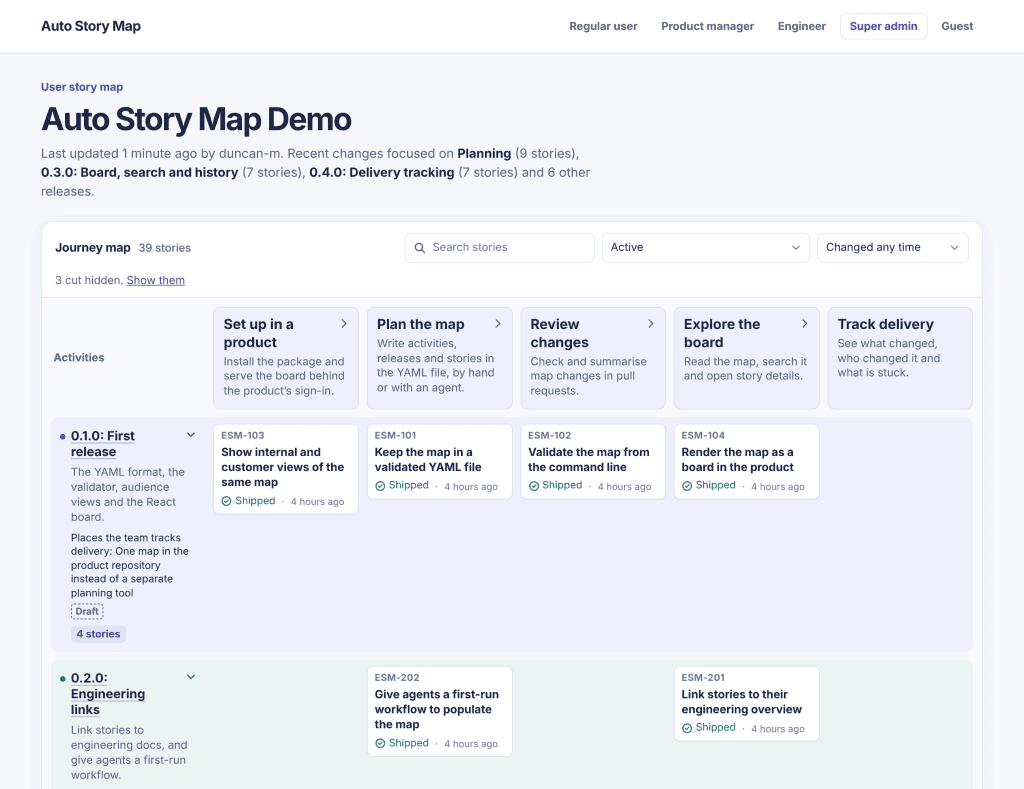
What a user story map actually does
Aa user story map is a visual plan of what you’re building. It lays out your product’s high-level user journey from left to right, then stacks the work required for each release from top to bottom.
Done properly, each horizontal release slice is tied to a clear set of measurable outcomes.
Once the work ships, ideally if you’re being a good PM you verify whether those changes achieved the intended metric shift/outcomes.
Why teams still need them
When a story map is accurate, it solves three recurring headaches for product leaders:
- Answering “are we there yet?” without slide decks: It gives stakeholders an immediate, shared view of where current delivery sits and when meaningful milestones will land.
- Helps with planning: Having a clear picture of all the features helps engineers, product people and designers have a better context and quick easy reference point for planning.
- Preventing institutional amnesia: In high-growth or high-turnover environments, it provides a single, legible record of what has already been built, so new PMs and engineers do not spend months reverse-engineering past decisions.
Why old story maps fail
Static story maps are time consuming to maintain. Multiple squads, PMs, and microservices, a board in Miro or FigJam is almost immediately out of date. Keeping it accurate requires manual gardening that always loses out to shipping.
The rise of agentic coding has widened that gap. When engineers and coding agents can ship features in hours rather than weeks, maintaining a separate planning canvas is hard.
What I built instead
There are plenty of dedicated story mapping and roadmapping tools on the market already, from standalone visual canvases to heavyweight Jira plugins.
Most are built for complex governance, require separate licences, and create yet another browser tab for teams to forget about.
My aim here was the opposite: something deliberately lightweight that lives right next to the code.
When I say I built it, I obviously mean Claude and I built it together. The result is an open-source npm package (a JavaScript library that plugs directly into a web application) that updates itself as engineers and coding agents build new functionality.
You can inspect the code and try it yourself on GitHub.
Rather than acting as another whiteboard to groom, the embedded map maintains a live picture of three things: what has already been built, what is currently in progress, and what has been decisively cut from the plan.
Recording what was cut turns out to be just as valuable as tracking shipped work, as it stops previously rejected ideas from resurfacing every quarter.
How to install it
You can add the package to an existing JavaScript or TypeScript project in a few minutes. Full configuration details are in the embedable-story-map repository.
-
Install the package from GitHub
Run npm install in your project root to pull the library directly from the repository:
npm install github:duncan-m/auto-story-map -
Initialise your story map data
Follow the repository README to add the story map data file to your codebase and instruct your coding agent (such as Claude Code or Cursor) to update release slices and feature statuses as part of your normal pull request workflow.
-
Mount the map component in your app
Import the component and render it on an internal route or dev-only page so your team and stakeholders can view the live map directly inside the product.
If your team has stopped updating its story map, or never started one because you ship too fast for static boards, moving a lightweight map into the codebase may be the only way to keep it honest.
If you have any suggestions or feature request feel free to put them on the repo or create a PR.
References
- Jeff Patton, User Story Mapping: Discover the Whole Story, Build the Right Product (O’Reilly Media, 2014). ↩